Quickstart
Start exposing your presence data with Tether in seconds
Join the Discord Server
Join the official Tether Discord server to let the Tether bot observe your presence, get help, ask questions.
Join the Official Tether Discord Server
Get support and connect with the community.
Copy User ID
We to observe a user we need their Discord user ID. You can get this by right clicking a user in Discord and selecting "Copy ID".
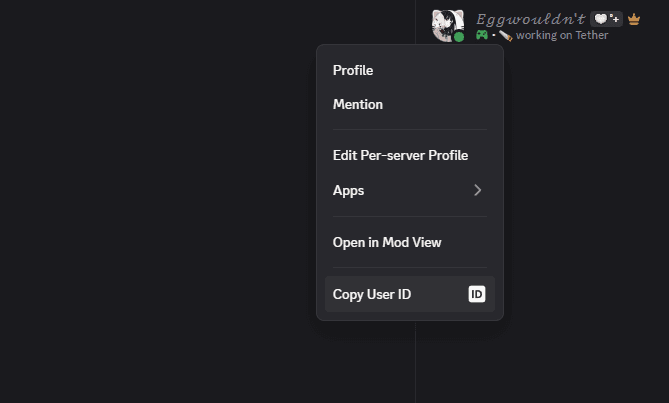
Not seeing "Copy ID"? Make sure you have Enabled Developer Mode in Discord's user settings.
Using the ID
Replace the {user_id} placeholder in the URL below with the Discord user ID you copied earlier:
A Discord user ID is a long number called a “snowflake”, for example: 123456789012345678.
Code Examples
HTTP API Example
This method only makes a single request to fetch presence data for a user. For real-time updates, see the WebSocket Gateway documentation.
// Replace with your actual user ID
const userId = "123456789012345678";

// The endpoint for Tether's public API
const url = `https://tether.eggwite.moe/v1/users/${userId}`;

// Use fetch to get the user's presence data
fetch(url)
  .then(response => {
    // Check if the response is OK (status 200)
    if (!response.ok) {
      throw new Error(`HTTP error! status: ${response.status}`);
    }
    // Parse the JSON body
    return response.json();
  })
  .then(data => {
    // Do something with the presence data
    console.log("Presence data:", data);
  })
  .catch(error => {
    // Handle errors (network issues, 4xx/5xx responses, etc.)
    console.error("Failed to fetch presence data:", error);
});pip install requests import requests
# Replace with your actual user ID
user_id = "123456789012345678"
# The endpoint for Tether's public API
url = f"https://tether.eggwite.moe/v1/users/{user_id}"
# Send a GET request to the API
response = requests.get(url)
# Check if the request was successful
if response.status_code == 200:
# Parse the JSON response
data = response.json()
print("Presence data:", data)
else:
# Print the error code and message
print(f"Error: {response.status_code} - {response.text}")// Import the standard library packages
package main
import (
"encoding/json"
"fmt"
"net/http"
"io/ioutil"
)
func main() {
// Replace with your actual user ID
userID := "123456789012345678"
// The endpoint for Tether's public API
url := fmt.Sprintf("https://tether.eggwite.moe/v1/users/%s", userID)
// Send a GET request to the API
resp, err := http.Get(url)
if err != nil {
fmt.Println("Request error:", err)
return
}
defer resp.Body.Close()
// Read the response body
body, err := ioutil.ReadAll(resp.Body)
if err != nil {
fmt.Println("Read error:", err)
return
}
// Parse the JSON response
var data map[string]interface{}
if err := json.Unmarshal(body, &data); err != nil {
fmt.Println("JSON error:", err)
return
}
// Print the presence data
fmt.Println("Presence data:", data)
}<?php
// Replace with your actual user ID
$user_id = "123456789012345678";
// The endpoint for Tether's public API
$url = "https://tether.eggwite.moe/v1/users/$user_id";
// Send a GET request to the API
$response = file_get_contents($url);
if ($response !== false) {
// Parse the JSON response
$data = json_decode($response, true);
echo "Presence data: ";
print_r($data);
} else {
// Handle error
echo "Failed to fetch presence data.";
}Source
Open source repo and contributions.
Join the Community
Ask questions and share ideas in Discord: discord.gg/ZggGDhjCyE